
Umbraco AI Agent Copilot
What is Umbraco AI Agent Copilot and how does it help editors?
An AI assistant beside your content in the familiar Umbraco backoffice. Agent Copilot supports writing, reviewing and targeted changes while the editor stays in control.
The short answer
Umbraco AI Agent Copilot is an Umbraco.AI add-on that adds a context-aware assistant to the backoffice. Editors can ask questions about the open content or media item, request writing suggestions and use available tools. The assistant uses the current content and configuration as context. This contextual Copilot limits changes to the open item; broader tasks belong to the separate Copilot Workspace. Sensitive operations require confirmation. The chosen AI model, instructions, permissions and usage determine the quality and cost of the experience.
Key points
- Help alongside the open content or media item.
- Agent configuration and tools determine the available actions.
- Human review remains essential; not an unrestricted site-wide autopilot.
How does Copilot work in the backoffice?
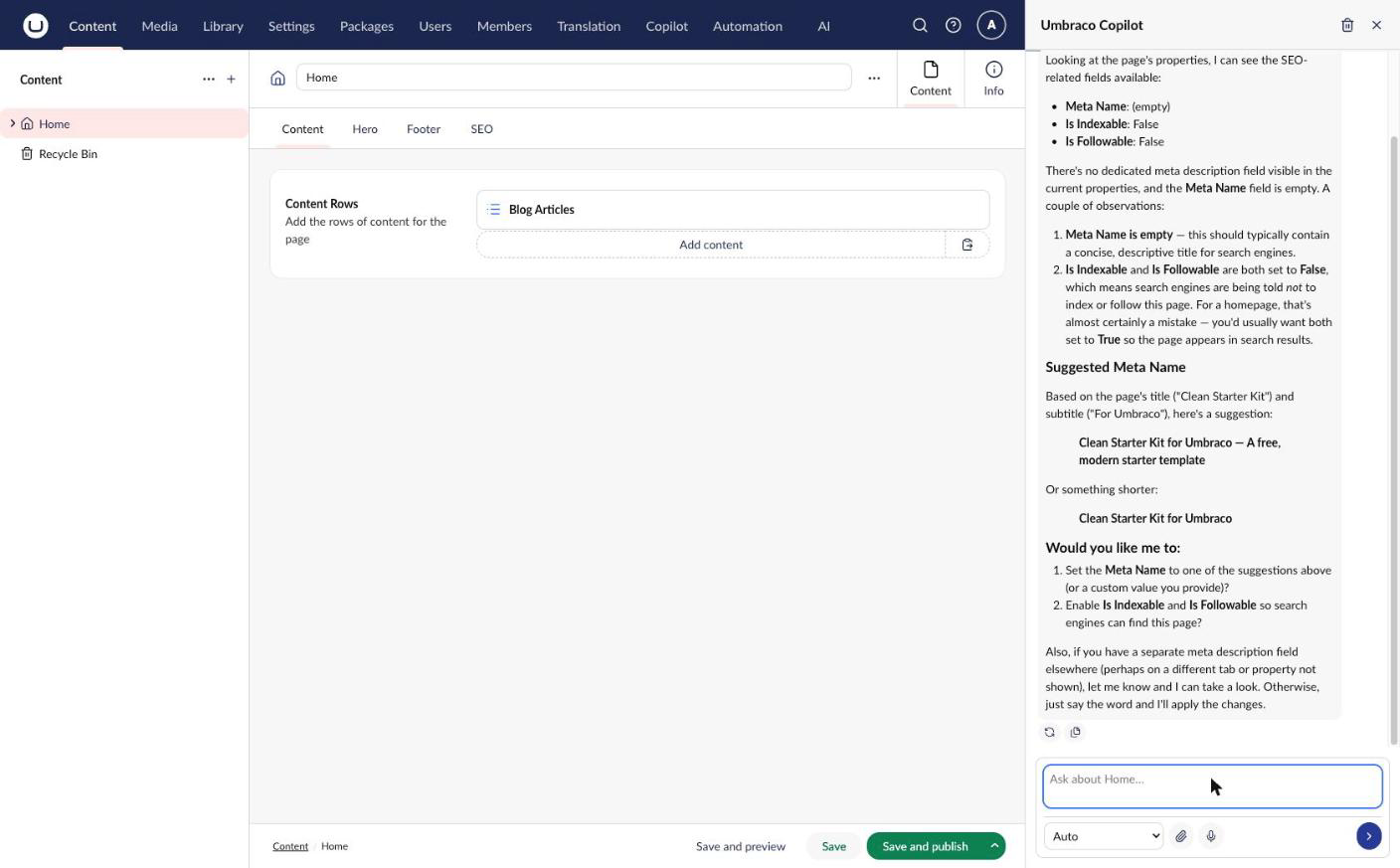
Open a content or media item and click the floating AI Assistant button in the bottom-right corner. The Copilot sidebar provides a conversation beside the editor. It receives context about the current item, including property values, structure, content type and media relationships. Responses stream in, and follow-up questions can build on the conversation.
An agent combines instructions, an AI profile and available tools. A single matching agent is used directly; with multiple agents, Auto mode can select an agent for each question. Configure and test routing so the right agent handles each task.
What can editors use Agent Copilot for?
Content page · Sustainable building
Title
Meta description
Applied by editor
Copilot
| Task | Potential assistance | Consideration |
|---|---|---|
| Writing and rewriting | Clarify an introduction, shorten text or propose alternative wording. | Review facts, tone of voice and accessibility. |
| Understanding content | Ask questions about the current page and summarise information. | Context does not guarantee a correct answer. |
| Updating fields | Use available tools to place suggested text in fields on the open item. | Supported fields and actions depend on tools and configuration. |
| Consulting media | Use supported text and Office files as context. | Not every file type has its contents extracted. |
Writing and rewriting
- Potential assistance
- Clarify an introduction, shorten text or propose alternative wording.
- Consideration
- Review facts, tone of voice and accessibility.
Understanding content
- Potential assistance
- Ask questions about the current page and summarise information.
- Consideration
- Context does not guarantee a correct answer.
Updating fields
- Potential assistance
- Use available tools to place suggested text in fields on the open item.
- Consideration
- Supported fields and actions depend on tools and configuration.
Consulting media
- Potential assistance
- Use supported text and Office files as context.
- Consideration
- Not every file type has its contents extracted.
Current documentation lists text files (.txt, .md, .csv) and Office files (.docx, .xlsx, .pptx). Other files, such as PDFs, only share the media item’s name and properties. Audio is not automatically transcribed. Extracted text is capped at 100,000 characters. Check support against the package version you select.
What boundaries and approvals apply?
The documentation says the Copilot surface blocks destructive backend tools outside the open item, even when an agent has broader tool permissions. Sensitive operations on the open item, such as saving or publishing staged changes, request approval. Editors can approve or deny the action. Human control does not make every suggestion automatically correct or safe.
- Define which content and data are shared with the AI provider.
- Give agents only the tools they need and test unwanted instructions and incorrect answers.
- Review personal data, confidential documents, retention and provider agreements before deployment.
- Check facts, text and image rights, and publication requirements before approving.
How does it differ from Umbraco.AI, Prompt and Copilot Workspace?
| Component | Role | When relevant |
|---|---|---|
| Umbraco.AI | The foundation for providers, profiles and AI management. | When you want central AI configuration and governance. |
| Prompt | Reusable instructions for a specific AI task. | For a fixed task such as suggesting a meta title. |
| Agent Copilot | A contextual conversation with an agent beside the open content or media item. | For interactive help with the current item. |
| Copilot Workspace | A separate add-on for broader conversations, persisted history and projects. | For multi-page or site-wide work, with its own configuration and boundaries. |
Umbraco.AI
- Role
- The foundation for providers, profiles and AI management.
- When relevant
- When you want central AI configuration and governance.
Prompt
- Role
- Reusable instructions for a specific AI task.
- When relevant
- For a fixed task such as suggesting a meta title.
Agent Copilot
- Role
- A contextual conversation with an agent beside the open content or media item.
- When relevant
- For interactive help with the current item.
Copilot Workspace
- Role
- A separate add-on for broader conversations, persisted history and projects.
- When relevant
- For multi-page or site-wide work, with its own configuration and boundaries.
This is Copilot inside Umbraco, not automatically Microsoft 365 Copilot or GitHub Copilot. A connection to a Microsoft AI provider is possible through Umbraco.AI, but the model and provider are selected separately. Read more about the foundation on our Umbraco.AI page.
What is needed to use Agent Copilot?
- 1
Check compatibility
Check the available release, supported Umbraco version and dependencies in the package information. Do not assume support for every existing installation.
- 2
Install the package
A developer installs Umbraco.AI.Agent.Copilot. The documentation states that Agent.UI and the Agent Runtime are included as dependencies.
- 3
Configure AI and the agent
Set up the required AI connection and profile. Create an agent under AI → Agents and select the Copilot surface to make it available in the sidebar.
- 4
Test with editors
Configure instructions and tools, check approvals and data flows, and test representative content before making the assistant available.
Frontend tools can execute browser actions and return results to the agent. Developers register these tools as Umbraco backoffice extensions; shared Agent.UI components support execution and approval dialogs. This enables customisation, but does not mean every desired action is available without development.
What are the monthly costs?
There is no fixed monthly AI usage price to quote in advance: cost depends on the selected LLM model and usage volume, including conversations and processed tokens. Context length, follow-up steps and agent routing can also generate additional model requests. Implementation, hosting and ongoing management may add costs. Agree usage limits and monitoring, check the current package licence, and budget separately for provider usage and implementation.
Perplex in practice
How can Perplex support adoption?
Start with a focused editorial task and representative content. Perplex can help assess the instructions, tools, provider agreements and approval steps you need. This lets you evaluate usefulness and costs before expanding adoption.
Frequently asked questions
Is Agent Copilot a chatbot for website visitors?
No. This add-on provides an assistant for editors in the Umbraco backoffice, beside the open content or media item.
Can Copilot independently change the entire website?
Not this contextual Copilot. Changes are scoped to the open item. Umbraco documents the separate Copilot Workspace for broader work.
Do editors need to approve changes?
Umbraco describes an approval step for sensitive actions such as saving or publishing staged changes. Check the tools and workflow in your own configuration.
Can it follow our brand and writing style?
Agent instructions and AI contexts can provide guidance. Results depend on the model and setup; editorial review remains necessary.
Does all data automatically stay within our hosting?
No. Content used as model context may be sent to the configured AI provider. Review the connection, processing and contractual terms beforehand.
Is Copilot included in every Umbraco installation?
No. It is a separate package with dependencies. Check supported versions and configure an appropriate agent and AI profile.
Sources and currency
Technical and legal statements on this page are based on primary documentation. Prices, versions and features change; always check the current source before making a decision.
- 1Agent Copilot: installation and architectureUmbraco Docs
- 2Contextual Copilot: usage, scope and approvalUmbraco Docs
- 3Frontend tools: extensions and executionUmbraco Docs
- 4Copilot Workspace: a separate, broader workspaceUmbraco Docs
- Content last reviewed
- Published
- Author
- Perplex Digital — Umbraco Contributing Platinum Partner
Read next
AI assistance for your editors?
Discuss suitable editorial tasks and how to retain control over quality, data and usage.